Projekt Dyabola
2341 new titles in November and about the importance of tools.
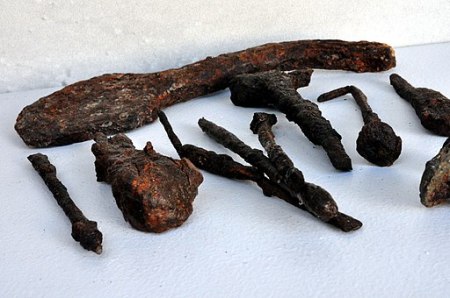
» Centum_Prata_(Kempraten)_-_Römerwiese_-_Eisenobjekte_(Nägel_&_Werkzeuge)_2012-01-16_14-22-30
Iron tools (Kempraten, Römerwiese site)
Leave a comment
Cancel reply
Δ
Comment
Subscribe
Subscribed
Projekt Dyabola
Join 150 other subscribers
Sign me up
Already have a WordPress.com account?
Log in now.
Projekt Dyabola
Subscribe
Subscribed
Sign up
Log in
Copy shortlink
Report this content
View post in Reader
Manage subscriptions
Collapse this bar
 Projekt Dyabola
Leave a comment