Projekt Dyabola
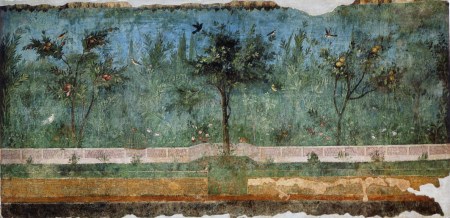
Habiter dans des jardins. Reside in gardens. One of 2739 new titles for the ‘Archaeological Bibliography’
» Rom-Villa-Livia
Foto: Rome, Villa di Livia (wikipedia)
Leave a comment
Cancel reply
Δ
Comment
Subscribe
Subscribed
Projekt Dyabola
Join 150 other subscribers
Sign me up
Already have a WordPress.com account?
Log in now.
Projekt Dyabola
Subscribe
Subscribed
Sign up
Log in
Copy shortlink
Report this content
View post in Reader
Manage subscriptions
Collapse this bar
 Projekt Dyabola
Leave a comment